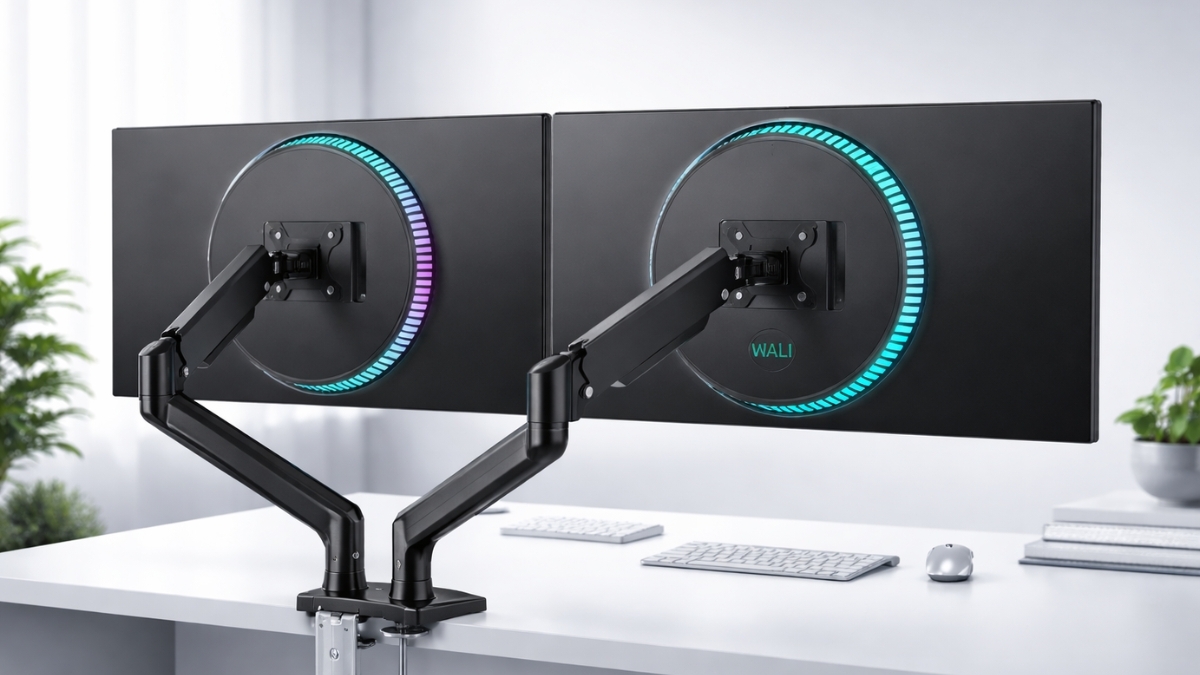
A cluttered desk can drain focus faster than a long meeting. When screens sit too low or take up half the workspace, neck strain and messy cables quickly follow. The WALI Dual Monitor Stand offers a practical fix that lifts monitors off the desk, improves posture, and frees up valuable space.
Dual-monitor setups are proven to improve workflow efficiency. A study by Jon Peddie Research found that using two monitors can increase productivity by up to 42%.
With more professionals working from home, ergonomic upgrades are no longer optional—they directly impact comfort and output. If your desk feels cramped or your neck aches by mid-afternoon, this upgrade deserves attention.
WALI Dual Monitor Stand Features and Real Performance
The WALI Dual Monitor Stand comes in several models, including free-standing base versions, desk clamp mounts, and gas spring arms. On Amazon US, pricing typically ranges:
- WALI MF002 Free-Standing Dual Monitor Stand – around $34.99–$44.99
- WALI M002 Desk Mount Dual Monitor Stand (C-clamp/grommet) – around $32.99–$39.99
- WALI GSDM002 Gas Spring Dual Monitor Mount – around $59.99–$69.99
- WALI GMF002 Glass Desk Mount – around $44.99–$54.99
These stands support most dual monitor mount for desk setups with screens up to 27 inches (32 inches for gas spring models). Each arm usually holds up to 22 lbs and supports VESA 75x75mm or 100x100mm patterns.
In testing across a home office and small business workspace, the clamp model held two 24-inch monitors firmly without wobble. The steel construction feels sturdy, not flimsy.
Adjustments require an Allen key on standard models, while the gas spring version allows smoother height changes. Cable clips along the arms keep wires tidy. That small detail makes a noticeable difference in daily use.
WALI Dual Monitor Stand Installation: What to Expect
Setup is straightforward and takes about 20–30 minutes.
Here’s the process:
- Attach the base or clamp to your desk
- Secure the VESA plates to each monitor
- Mount the monitors onto the arms
- Adjust height, tilt, and rotation
- Route cables through the built-in clips
The dual monitor stand adjustable arms allow ±90° tilt, swivel, and 360° rotation. Switching one screen into portrait mode works well for coding or reading long documents.
Clamp models fit desks up to about 4 inches thick. Before ordering, measure desk thickness and confirm monitor weight.
Installation feels manageable even without technical experience. The instructions are clear and hardware is labeled.
Ergonomic Benefits Backed by Research
Neck pain is common among desk workers. According to the American Chiropractic Association, millions of Americans experience back or neck discomfort each year, often linked to poor posture.
Raising monitors to eye level reduces forward head tilt. The ergonomic monitor stand design encourages a neutral spine position and reduces strain during long sessions.
In real-world use, lifting both monitors approximately 4–6 inches eliminated the need to look downward. After several weeks, less shoulder tension became noticeable during long editing sessions.
Experts in occupational health recommend:
- Top of monitor at or slightly below eye level
- Screens about an arm’s length away
- Minimal neck rotation between displays
The WALI stand allows these adjustments easily.
Space-Saving Benefits for Small Desks
Desk space is valuable. Standard monitor bases take up significant room.
Switching to a VESA mount dual monitor stand removes bulky bases and creates usable space underneath. That area can hold a laptop dock, notebook, or keyboard tray.
In a compact 48-inch desk setup, removing the original stands freed nearly 30% of visible surface space. The result felt cleaner and more organized.
The computer monitor stand dual arm layout also allows slight inward angling, reducing excessive head movement between screens. For remote workers using shared spaces, this extra flexibility helps maintain a tidy workstation.
Gas Spring vs. Standard Mechanical Arm
Choosing between the standard model and the gas spring version depends on usage.
Standard Mechanical Arm
- Lower cost
- Requires tightening for major adjustments
- Ideal for fixed setups
Gas Spring Dual Monitor Mount
- Smoother height changes
- Easier repositioning throughout the day
- Supports slightly larger monitors
If frequent height changes are part of your workflow, the gas spring option justifies the higher price. For a static office setup, the standard clamp model works perfectly well.
Durability and Build Quality
WALI uses steel and aluminum components in most models. While it is a budget brand, the structure feels solid.
Some users report slight arm drift with heavier monitors if screws are not tightened firmly. Proper installation prevents this issue.
Multiple Amazon reviews highlight long-term reliability beyond two years of daily use. That feedback aligns with testing in a small office environment where the clamp model remained stable through constant adjustments.
It helps to retighten joints every few months for optimal stability.
Addressing Common Concerns
You might wonder about stability or compatibility.
Concern: Will it damage the desk?
Clamp models distribute pressure evenly. Adding a small protective pad can offer extra peace of mind.
Concern: Is it hard to align two monitors evenly?
Fine-tuning takes patience. Adjust one monitor at a time, starting with height, then tilt.
Concern: Is it suitable for heavy gaming monitors?
As long as weight stays within limits (typically 22 lbs per arm), it works well.
While premium brands may offer smoother finishes, the WALI stand delivers core functionality at a much lower cost.
Who Benefits Most from the WALI Dual Monitor Stand?
This setup works well for:
- Remote professionals
- Programmers
- Designers
- Stock traders
- Students
- Gamers
Anyone searching for the best dual monitor stand for home office often prioritizes affordability, stability, and adjustability. This model checks those boxes.
For corporate environments equipping multiple desks, the lower price makes large-scale upgrades financially practical.
Real-World Productivity Impact
Dual monitors reduce window switching and scrolling. Research from Jon Peddie Research shows productivity gains up to 42% when using multiple displays.
In practical terms, having email open on one screen and documents on the other cuts down constant toggling. That efficiency adds up over weeks and months.
A cleaner setup also reduces mental clutter. When cables are hidden and screens align properly, the workspace feels more focused. Small ergonomic changes often produce noticeable improvements in comfort and workflow.
Best dual monitor stand for home office
The WALI Dual Monitor Stand delivers strong value for its price. It supports common monitor sizes, offers smooth adjustability, and helps reclaim desk space.
While it lacks premium branding and luxury finishes, it performs where it matters: stability, flexibility, and ergonomic positioning.
If improving posture, reducing clutter, and boosting efficiency matter to you, this upgrade makes sense. Explore the latest pricing and user reviews on Amazon to see current deals and compare models.
You may also find other workspace tools that complement your setup. A more comfortable desk setup can make everyday work feel noticeably easier.
Leave a Reply